
Biometric Login Setup Guide for Betmica
Biometric Login Setup Guide for Betmica
In an era where convenience and security are paramount, biometric authentication offers a seamless way to access your online accounts. This guide provides a detailed, step-by-step walkthrough for setting up and using biometric login for your Betmica casino account, ensuring your gaming experience is both secure and hassle-free.
What is Biometric Authentication and Its Benefits?
Biometric authentication uses your unique physical characteristics, such as your fingerprint or facial features, to verify your identity. For Betmica players, this technology replaces the traditional password or PIN entry. The primary benefits are enhanced security, as your biometric data is extremely difficult to replicate, and unparalleled convenience. You no longer need to remember complex passwords; a simple touch or glance is all it takes to log in and claim your Betmica bonus or dive into your favorite games.
Prerequisites for Enabling Biometric Login
Before you begin the setup process, ensure you meet the following requirements. Your device must have a built-in biometric sensor, such as a fingerprint reader or facial recognition camera (e.g., Touch ID or Face ID on iOS, or a compatible fingerprint scanner on Android). You must also have the latest version of the Betmica mobile app installed on your device. Finally, you need to have an existing, fully verified account. This typically involves completing a KYC (Know Your Customer) process by submitting documents like a government-issued ID and a recent utility bill to Betmica casino's security team, which can take 24-48 hours for approval.
https://www.youtube.com/watch?v=2PhwLCPAdZYStep-by-Step Setup Instructions
- Open the Betmica mobile app and log in using your standard username and password.
- Navigate to your account settings, often found by tapping your profile icon.
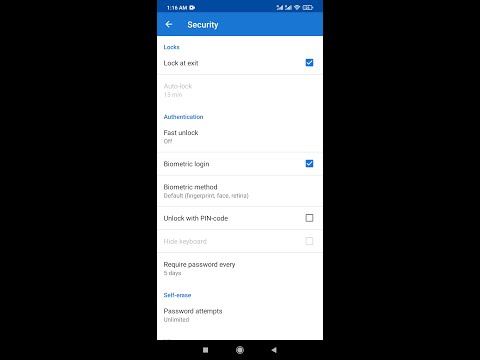
- Locate and select the "Security" or "Login Preferences" menu option.
- Find the toggle or button for "Biometric Login" or "Fingerprint/Face Login."
- You will be prompted to authenticate using your device's native biometric method (e.g., scan your fingerprint).
- Confirm your choice. A success message will appear, indicating the feature is now active.
The entire process usually takes less than two minutes to complete.
Common Troubleshooting and Solutions
Even the most robust technology can encounter hiccups. Here are common issues Betmica players face with biometric login and how to resolve them.
| Problem | Likely Cause | Solution |
|---|---|---|
| Login fails repeatedly | Dirty sensor or wet fingers | Clean the sensor and ensure your fingers are dry. |
| Option is grayed out | Device permissions not granted | Check your phone's system settings to ensure the Betmica app has permission to use the biometric sensor. |
| App update required | Running an old version of the app | Visit your device's app store and download the latest update for the Betmica app. |
| Biometric data changed | New fingerprint or face scan added to device | You may need to disable and re-enable the feature within the Betmica app to re-register. |
Security Considerations and Best Practices
While biometric login is highly secure, it is not infallible. It is crucial to remember that this method is linked to your physical device. If your phone is lost or stolen, you should immediately disable biometric access from another device by logging into your Betmica account via a web browser and changing your password. This will lock out the biometric login on the missing device. For added security, always use a strong, unique password as your account's primary backup. Furthermore, be cautious when entering any Betmica promo code; ensure you are on the official app or website to avoid phishing attempts, even when using biometrics to log in.
Conclusion: Streamlining Your Access
Setting up biometric authentication is a straightforward process that significantly enhances your daily interaction with Betmica. It removes the friction of password entry, allowing you to quickly access promotions, claim your Betmica no deposit offers or Betmica free spins, and start playing within seconds. By following this guide, you can enjoy a perfect blend of top-tier security and modern convenience, making your overall experience at Betmica smoother and more enjoyable.